Act
Citations
AI assistants build their answers from a limited set of websites. The Citations pages list those websites for your prompts and tell you what to do with each one. They are fed by the sources of your AI Reputation runs, under ACTION › Citations.
Review Citation
Pages that already talk about your products. Check that they say the right thing and that they link to you. The counters show the pages to review, the pages where you could ask for a link, and the pages already linking to you. For each source you see the product mentioned, the domain rating and the action to take: Check, Ask or Follow up. Open a source to read how it mentions you and in which AI answers it was used.
Acquire Citation
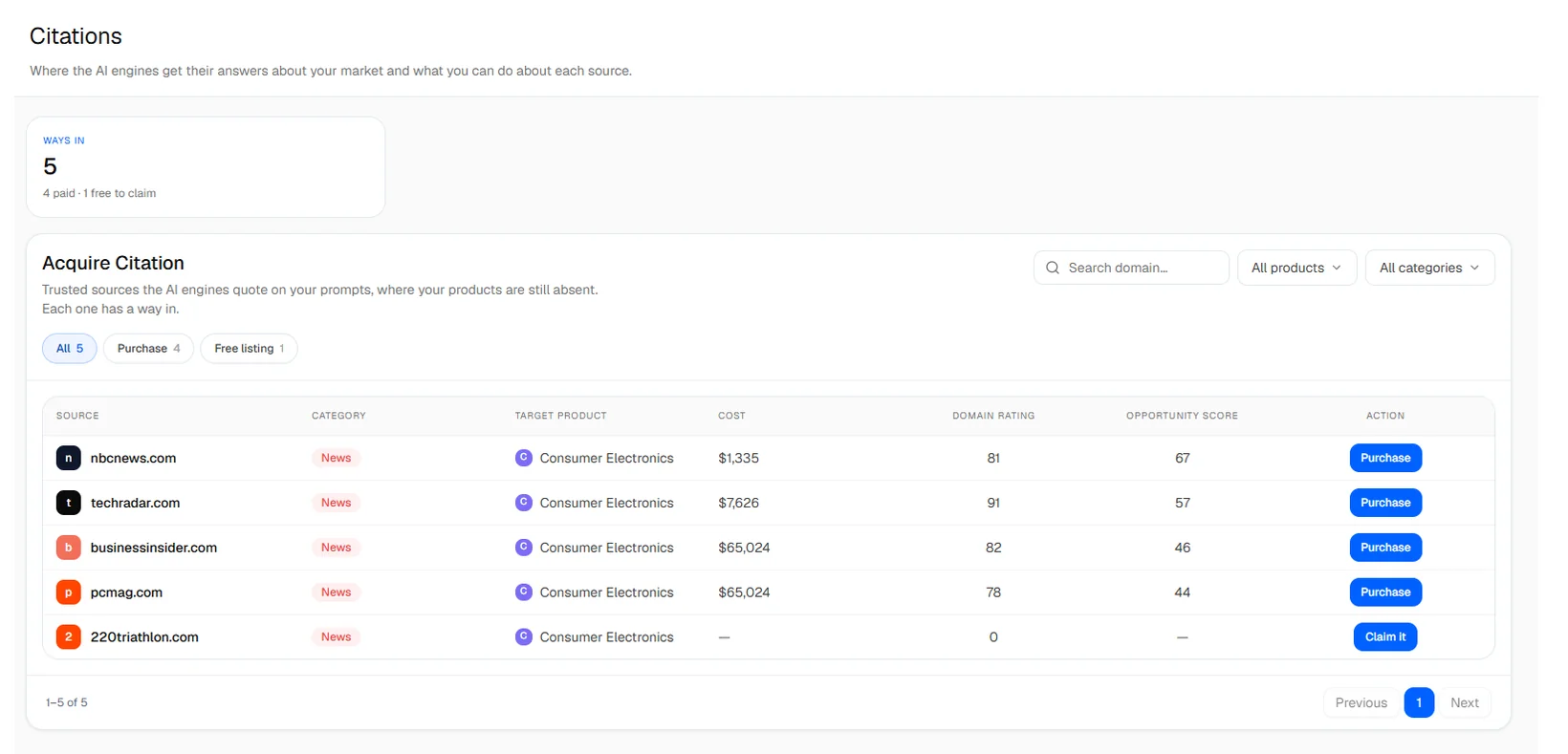
Trusted sources that AI assistants quote on your prompts, where your products are still absent. Each row has a way in: a Purchase (a sponsored article or listing) or a Free listing you can claim.
- The counters show the number of ways in, the total cost to take them all and the best value.
- Filter by type, status, product and category, set a budget per placement and sort by best value or cheapest first.
- Purchase opens the offers found on link marketplaces for that domain, with the best price. You buy directly on the marketplace.
- Claim it prepares an outreach email.
Each paid source shows an opportunity score out of 100, based on its authority, its cost, its reach across your products and its type of site. A higher score is a better opportunity.
Other Citation
Sources that need no action: your own profiles, or sites out of reach. They are kept so that your coverage figures stay complete.
Outreach emails
From Review Citation and Acquire Citation, Prepare outreach drafts an email to the site: ask for a link, correct a fact, or claim a listing. The draft includes your brand, the sentence that mentions you and the competitors cited. Poliris fills in the contact email when it finds one. Send & track opens the email in your own mail client: Poliris does not send it and does not follow up automatically yet.
Putting it all together
The AI Reputation audit and the technical audit answer different questions, and each one helps you read the other. This page suggests a simple routine.
What you fix changes what AI can say
An assistant can only quote pages it can reach and read. Blocked crawlers, missing titles or thin pages limit how often you can be cited.
What AI says tells you where to start
A weak topic or a missing source points to the pages and content to work on first.
A weekly routine
-
Check the scores
Open the AI Reputation Overview and the health score of your site. Note what moved since last week.
-
Work from the Roadmap
Open the Execution board, launch the tasks of the week and mark finished ones as accomplished.
-
Look at the evidence
When a score drops, open Prompt Explorer or Cited Prompts for the answers, and the Issues tab for the pages concerned.
-
Measure again
Re-run the analysis (or let the schedule do it), re-crawl the site after technical changes, then click Update plan.
Common situations
Low visibility, healthy site
The site works but assistants do not know enough about you. Write content on the weak topics and get cited on the sources they use.
High visibility, weak sentiment
You are mentioned but not described well. Read the negative answers in Cited Prompts and correct the facts on the pages they cite.
Good visibility, many technical issues
Fix the critical issues now: a blocked or slow page is less likely to be read and cited.
Low everywhere
Start with Page Access (what blocks crawlers), then work on one weak topic at a time.